WEB AND iOS TOGETHER

The match made in Heaven.

See availability, build rosters, and keep every player informed from a clear, intuitive app.

Captain dashboard browser view
BUILT FOR CAPTAINS

Ditch emails and spreadsheets.

Bring every part of team match play into one shared place. Captains and players always see the same schedule, availability, roster, and latest update.

  • One source of truth for the team
  • No more roster spreadsheets
  • No more reply-all email chains
Captain communications overview
CAPTAIN TOOLS

Everything within reach.

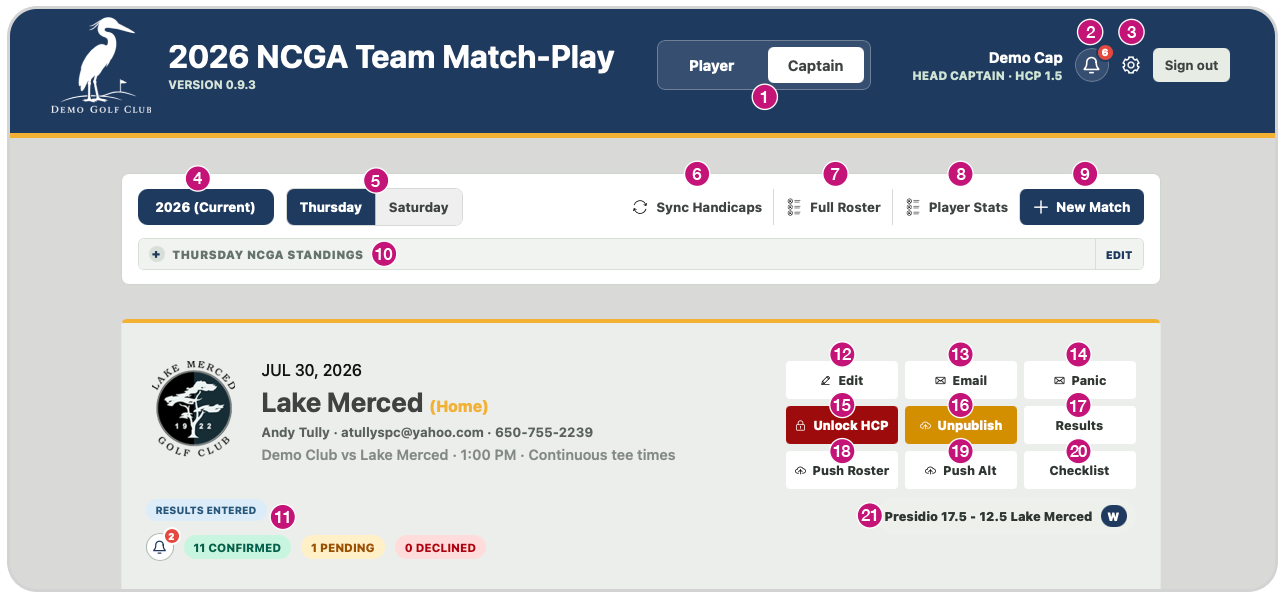
Numbered overview of the Team Match Play captain dashboard
  1. Is the team captain a player as well? Toggle between both roles.
  2. See all match notifications from players in one place.
  3. Manage club settings: upload the club logo, choose colors, select Thursday, Saturday, or both, and manage birdie facts.
  4. Switch between seasons while keeping historical data.
  5. Toggle between Thursday and Saturday matches.
  6. Sync handicaps using the Golf Genius API.
  7. View every player’s GHIN, email, and phone number.
  8. See stats for all players, including home, away, gross, net, and averages.
  9. Set up matches against any team using preloaded captain information.
  10. View current league standings.
  11. See match notifications and badges for information at a glance.
  12. Edit: Change match details, including time, date, and shotgun format.
  13. Email: Send the 12-person roster to everyone playing in one click.
  14. Panic: Need players at the last minute? Contact them in one click.
  15. Lock HCP: Lock handicaps for the match.
  16. Publish: Let all 12 players know when the roster is ready.
  17. Results: Enter player scores and win/loss/tie results using preloaded tee boxes.
  18. Push Roster: Send a push notification to all pending players on the roster.
  19. Push Alt: Send a push notification to every player on the alternate list.
  20. Checklist: Give pro-shop staff a match-day player check-in list.
  21. Calculate match results from the players’ win/loss/tie results.
BUILT FOR CAPTAINS AND PLAYERS ALIKE

The whole season in your pocket.

Team Match Play screen 1
Team Match Play screen 2
Team Match Play screen 3
Team Match Play screen 4
Player availability view
AVAILABILITY

Your season starts with one tap.

Choose Available, Maybe, or Unavailable for every match. Captains get a current player pool and you always know what still needs a response.

Published roster and pairings view
ROSTERS

Everything you need for match day.

If you have been selected for a roster, confirming your roster spot lets captains know you are ready to play.

Results and standings view
MY MATCHES

Watch the season take shape.

On the roster for a match? See them all in one place.

EVERYTHING YOUR TEAM NEEDS

One season. One shared system.

Captain View

Player availability tracking
See Available, Maybe, Unavailable, and missing responses.
Match creation
Set opponents, dates, times, locations, and formats.
Roster builder
Select starters and alternates directly from the available player pool.
Pairings
Add players to a roster and have them sort by handicap.
Handicap syncing
Retrieve current handicaps through the Golf Genius API.
Handicap locking
Preserve the handicaps used for a specific match.
Player directory
Access GHIN, email, phone, and player details.
Player statistics
Review home/away, gross, net, and averages for any season or all seasons.
Roster publishing
Notify all selected players when the roster is ready.
Email roster
Email the 12-person roster in one click.
Push notifications
Contact rostered, pending, alternate players and auto match reminders.
Panic contact
Quickly find players when someone is needed at the last minute.
Results entry
Record scores and win/loss/tie outcomes with preloaded tee boxes.
Automatic match scoring
Calculate the team result from individual player outcomes.
Standings
Keep current league standings.
Match-day checklist
Give pro-shop staff a player check-in list.
Notification center
Review player responses and match activity in one place.
Club settings
Manage logos, colors, league participation days, and birdie facts.
Season history
Create and switch seasons without losing historical data.
Thursday/Saturday views
Toggle between Thursday and Saturday league days for intuitive organization.
Captain/player toggle
Let playing captains switch between both roles.

Player View + iOS

Season availability
Respond Available, Maybe, or Unavailable for every match.
Match schedule
View dates, opponents, locations, formats, and start times.
Roster confirmation
Confirm a roster spot or tell the captain you cannot play.
My Matches
Keep rostered matches together in one view.
Match details
Review full roster, playing partner, and tee time for rostered matches.
Results
Review individual and team outcomes after play.
Standings
See current Thursday and Saturday league standings.
Player/team statistics (Web app only)
Review home/away, gross, net, and averages for any season or all seasons.
Season leaders (iOS app)
See the season’s top-performing players and key leaderboard results in the iOS app.
Captain/player switching
Give playing captains access to both experiences.
Roster notifications
Receive an alert when selected as a starter or alternate.
Push notifications
Receive match, roster, reminder, and update alerts.
Calendar access
Add scheduled matches directly to the device calendar.
Birdie facts
Shows rotating golf and local-interest facts inside the app.
Team Match Play app icon

Captains and Players, Connected.

Team Match Play closing app image
REQUEST A DEMO

See it in action.

Tell us a little about your club and team.